


 Microsoft 365
PRODUCTIVITY. COLLABORATION. SECURITY.
Transform the Way Your Business Works with Microsoft 365
Empower your organization with the world's leading cloud productivity platform. Microsoft 365 combines productivity applications, intelligent collaboration tools, enterprise-grade security, and AI-powered experiences to help your teams work smarter, communicate more effectively, and achieve more from anywhere.
As a trusted Microsoft partner in Iraq, Avesta helps organizations plan, deploy, secure, manage, and optimize Microsoft 365 environments tailored to their business needs.
Microsoft 365 helps your organization improve productivity, manage costs, and work securely. Depending on the plan, it combines productivity apps, cloud services, and security and device management capabilities. Whether your team works in the office or remotely, there’s a Microsoft 365 plan to meet your needs.
Modernize with Windows 11 and Microsoft 365 apps, and keep supported software up to date.
- Upgrading eligible devices to Windows 11 or replacing older hardware with new Windows 11 devices.
- Moving from perpetual Office to subscription-based Microsoft 365 apps, with IT teams managing regular security and feature updates.
This approach helps users work productively and securely while simplifying software management for IT teams.
01
PRODUCTIVITY APPLICATIONS
Office 365
On smaller screens, scroll the illustration to see all three application groups.
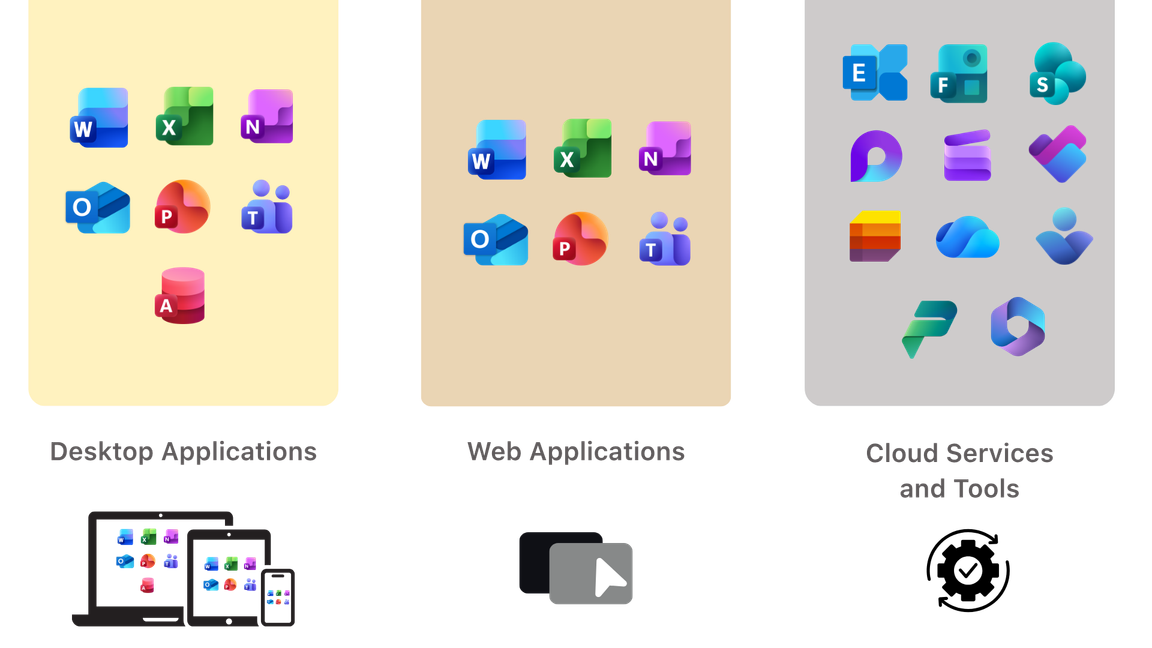
App and service availability varies by plan; the illustration shows the wider Microsoft 365 portfolio.
Stay up to date with Windows 11 and Microsoft 365 apps.
Office 365 helps you access your email, important documents, contacts, and calendar on nearly any device from almost anywhere. It frees you to work where and when you choose, allowing you to respond to important requests right away, no matter where you are. Because you can use your mobile device to access email and documents, you won’t have to hurry back to the office. When traveling, you can access your email and even edit online documents from most popular web browsers.
Device allowance: With a plan that includes desktop apps, each licensed user can use Microsoft 365 apps on up to 5 PCs or Macs + 5 tablets + 5 phones. Business Basic includes web and mobile apps only.
02
OPERATING SYSTEM
Windows 11
Windows 11 is Microsoft's modern operating system designed to deliver a more productive, secure, and user-friendly computing experience for both personal and business users.
Compare editions. On smaller screens, scroll the table horizontally.
| Features | Windows 11 Home | Windows 11 Pro | Windows 11 Enterprise |
|---|---|---|---|
| Core security | ✓ | ✓ | ✓ |
| Drive encryption | Device Encryption on eligible hardware | Full BitLocker | BitLocker + advanced management |
| Domain / Microsoft Entra join | — | ✓ | ✓ |
| Business device management | Basic/local management | Group Policy, MDM, Active Directory | All Pro capabilities plus broader management |
| Remote Desktop host | — | ✓ | ✓ |
| Hyper-V virtual machines | — | ✓ | ✓ |
| Windows Sandbox | — | ✓ | ✓ |
| Enterprise-only security | — | — | ✓ |
| Advanced update/deployment | Consumer Windows Update | Business update and deployment | Broadest controls; Enterprise deployment |
| Feature-update support period | 24 months | 24 months | 36 months |
| Licensing / typical use | Retail/OEM; personal use | Retail/OEM or commercial | Commercial per-user E3/E5 |
03
SECURITY APPLICATIONS
Microsoft Enterprise Mobility + Security
Microsoft Enterprise Mobility + Security (EMS) helps organizations secure this modern workplace by bringing together identity management, endpoint management, information protection, and cloud security into one integrated security platform.
With EMS, businesses can control who has access, what devices can access company resources, and how sensitive information is protected.
Included capabilities depend on the EMS edition. EMS E5 includes Defender for Identity and Defender for Cloud Apps; EMS does not include every Defender or Purview product.

Entra ID

Intune

Purview

Defender
Microsoft 365 brings productivity, collaboration, and security together
Microsoft 365 Enterprise includes E3 and E5 plans that combine Office 365, Windows Enterprise, and Enterprise Mobility + Security. Features and licensing requirements vary by plan.
Microsoft 365 Business offers plans for small and midsize organizations with up to 300 users. Basic and Standard cover everyday productivity and collaboration needs; Premium adds advanced security and device management.

Frontline security and compliance add-ons require an eligible base subscription, such as Microsoft 365 F1 or F3.
BUSINESS EMAIL
Exchange Online

Exchange OnlinePlan 1
- 50 GB mailbox and 50 GB archive.
- Litigation Hold not included.
- Data loss prevention (DLP) not included.
- OneDrive storage requires a separate eligible license.
Exchange OnlinePlan 2
- 100 GB mailbox and archive that can auto-expand up to 1.5 TB when enabled, subject to Microsoft’s limits.
- Litigation Hold included.
- Data loss prevention (DLP) for Exchange email included.
- OneDrive storage requires a separate eligible license.
PRODUCTIVITY FOR YOUR ORGANIZATION
Microsoft 365 Business
Business Basic
- Teams chat, calls, and meetings for up to 300 people (with Teams license)
- Web and mobile versions of Office apps
- 1 TB of OneDrive storage per user
- Business-class email
- Standard security
- Anytime phone and web support
Business Standard
- Teams chat, calls, and meetings for up to 300 people (with Teams license)
- Desktop, web and mobile versions of Office apps
- 1 TB of OneDrive storage per user
- Business-class email
- Standard security
- Anytime phone and web support
Business Premium
- Everything in the corresponding Business Standard version, plus:
- Advanced security
- Access and data control
- Cyberthreat protection
Apps for Business
- Desktop versions of Office apps with premium features
- 1 TB of OneDrive storage per user
- Standard security
- Anytime phone and web support
FIND THE RIGHT FIT
Compare Microsoft 365 Business plans
Teams features require a version with Teams or a separate eligible Teams license. On smaller screens, scroll the table horizontally.
| Features | Microsoft 365Business Basic | Microsoft 365Apps for Business | Microsoft 365Business Standard | Microsoft 365Business Premium |
|---|---|---|---|---|
| Teams chat and meetings (with Teams license) | ✓ | — | ✓ | ✓ |
| Web and mobile versions of Office apps | ✓ | ✓ | ✓ | ✓ |
| Business email and calendaring | ✓ | — | ✓ | ✓ |
| File storage and sharing | ✓ | ✓ | ✓ | ✓ |
| Security and compliance | ✓ | ✓ | ✓ | ✓ |
| Support and deployment | ✓ | ✓ | ✓ | ✓ |
| Tools to build and manage your business | ✓ | ✓ | ✓ | ✓ |
| Desktop versions of Office apps for PC and Mac | — | ✓ | ✓ | ✓ |
| Advanced threat protection | — | — | — | ✓ |
| Advanced device management with Microsoft Intune | — | — | — | ✓ |
Partially included Included Not included